Celestial Altar

From Arcana Novum Wiki
Jump to navigation Jump to search
Celestial Altar
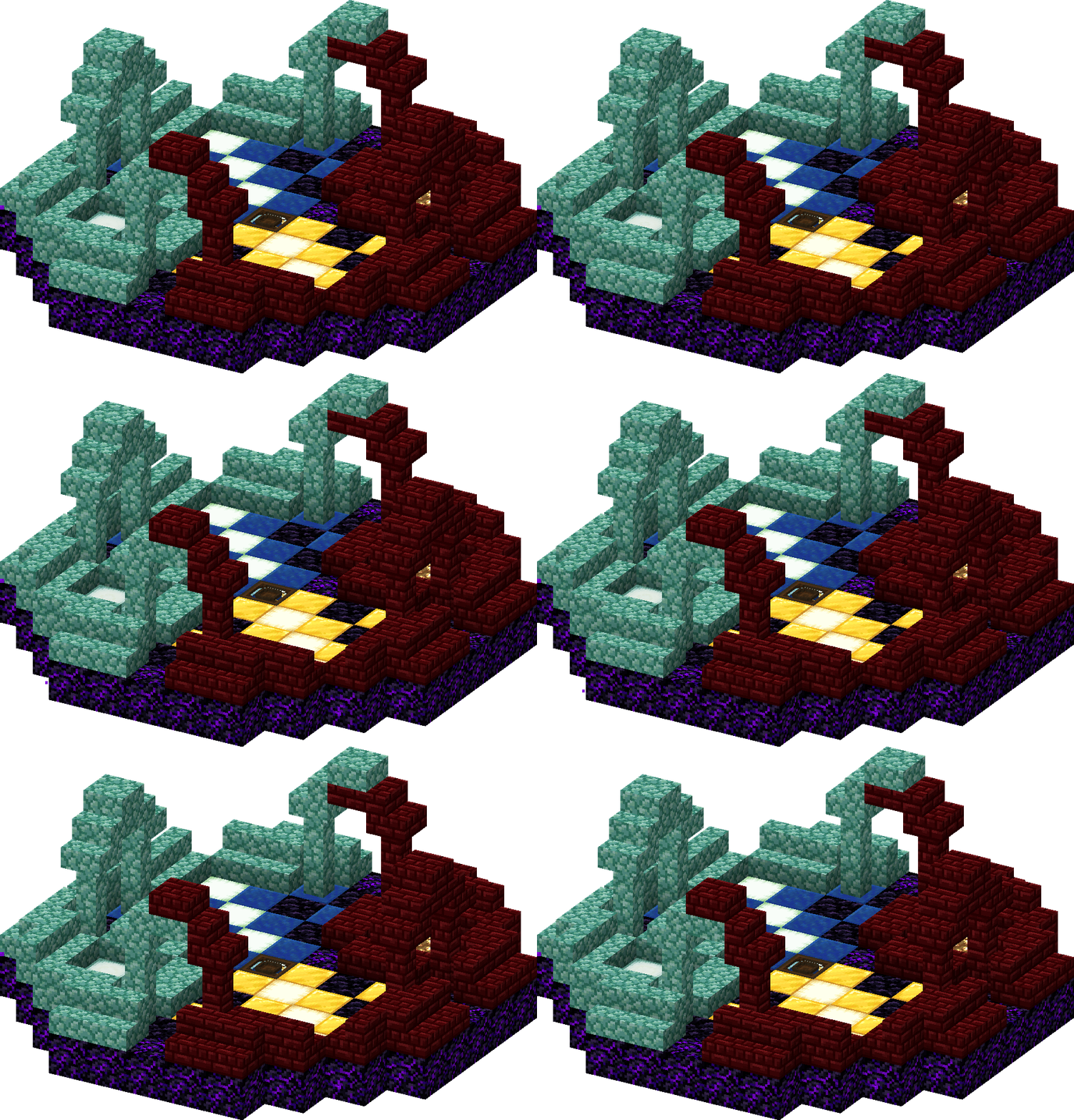
A dark wooden framed box with glass sides. Inside is a floating and slowly rotating sun or moon depending on which mode it is in. At the top of the box is a wooden offering dish, like other Altars. The Multiblock Construct vaguely resembles an open-air shrine garden made of red nether brick and prismarine. It has one side dedicated to the sun with glowstone and gold and the other to the moon with sea lanterns and lapis.
Rarity Sovereign
Type Block
Base item Pearlescent Froglight
Stackable No
Categories Altars, Blocks, Multiblocks
ID arcananovum:celestial_altar

The Celestial Altar is a multiblock Altar which can be used to change the time of day and the moon phase.

Appearance

A dark wooden framed box with glass sides. Inside is a floating and slowly rotating sun or moon depending on which mode it is in. At the top of the box is a wooden offering dish, like other Altars. The Multiblock Construct vaguely resembles an open-air shrine garden made of red nether brick and prismarine. It has one side dedicated to the sun with glowstone and gold and the other to the moon with sea lanterns and lapis.

Tooltip
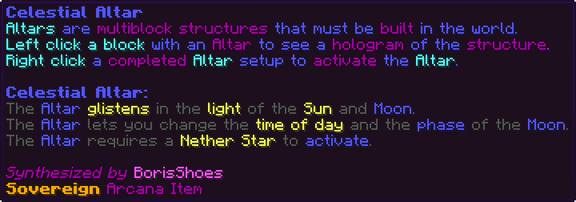
Altars are multiblock structures that must be built in the world. Left click a block with an Altar to see a hologram of the structure. Right click a completed Altar setup to activate the Altar. Celestial Altar: The Altar glistens in the light of the Sun and Moon. The Altar lets you change the time of day and the phase of the Moon. The Altar requires a Nether Star to activate.

Altars are multiblock structures that must be built in the world.
Left click a block with an Altar to see a hologram of the structure.
Right click a completed Altar setup to activate the Altar.

Celestial Altar:
The Altar glistens in the light of the Sun and Moon.
The Altar lets you change the time of day and the phase of the Moon.
The Altar requires a Nether Star to activate.

Obtaining

Research

Unlocks after completing these research tasks:

Crafting

Crafted in the Starlight Forge.

Used when the server has the Classic Recipes pack enabled.

Crying Obsidian32Block of Gold4Block of Gold4Glowstone4Glowstone4Block of Gold4Obsidian32Block of Gold4Glowstone4Glowstone4Stardust12Nether Star2Pearlescent Froglight16Nether Star2Stardust12Sea Lantern4Sea Lantern4Block of Lapis Lazuli4Obsidian32Block of Lapis Lazuli4Sea Lantern4Sea Lantern4Block of Lapis Lazuli4Block of Lapis Lazuli4Crying Obsidian32
➔Celestial Altar
Ingredient Total
Crying Obsidian 64
Block of Gold 16
Glowstone 16
Obsidian 64
Stardust 24
Nether Star 4
Pearlescent Froglight 16
Sea Lantern 16
Block of Lapis Lazuli 16

Multiblock Structure

The Celestial Altar built in the world

The structure is 11×5×11 blocks (X×Y×Z), shown one layer at a time from above. The Celestial Altar itself is outlined in gold. Hover a block for its exact state; an arrow shows which way it faces.

North ↑
Crying ObsidianCrying ObsidianCrying ObsidianCrying ObsidianCrying ObsidianCrying ObsidianCrying ObsidianObsidianObsidianBlock of GoldObsidianCrying ObsidianCrying ObsidianGlowstoneGlowstoneCrying ObsidianBlock of GoldObsidianBlock of GoldOchre Froglight (axis: y)Crying ObsidianCrying ObsidianCrying ObsidianGlowstoneGlowstoneCrying ObsidianObsidianBlock of GoldOchre Froglight (axis: y)Block of GoldObsidianCrying ObsidianCrying ObsidianObsidianCrying ObsidianCrying ObsidianCrying ObsidianBlock of GoldOchre Froglight (axis: y)Block of GoldObsidianBlock of GoldCrying ObsidianCrying ObsidianObsidianBlock of Lapis LazuliObsidianBlock of Lapis LazuliCelestial Altar (activatable: true, facing: west) - the core←Block of GoldObsidianBlock of GoldObsidianCrying ObsidianCrying ObsidianBlock of Lapis LazuliObsidianBlock of Lapis LazuliVerdant Froglight (axis: y)Block of Lapis LazuliCrying ObsidianCrying ObsidianCrying ObsidianObsidianCrying ObsidianCrying ObsidianObsidianBlock of Lapis LazuliVerdant Froglight (axis: y)Block of Lapis LazuliObsidianCrying ObsidianSea LanternSea LanternCrying ObsidianCrying ObsidianCrying ObsidianVerdant Froglight (axis: y)Block of Lapis LazuliObsidianBlock of Lapis LazuliCrying ObsidianSea LanternSea LanternCrying ObsidianCrying ObsidianObsidianBlock of Lapis LazuliObsidianObsidianCrying ObsidianCrying ObsidianCrying ObsidianCrying ObsidianCrying ObsidianCrying ObsidianCrying Obsidian
North ↑
Red Nether Brick Stairs (facing: south, half: bottom, shape: straight, waterlogged: false)↓Red Nether Brick Stairs (facing: south, half: bottom, shape: straight, waterlogged: false)↓Red Nether Brick Stairs (facing: south, half: bottom, shape: straight, waterlogged: false)↓Red Nether Brick Stairs (facing: south, half: bottom, shape: straight, waterlogged: false)↓Red Nether Brick Stairs (facing: north, half: bottom, shape: straight, waterlogged: false)↑Red Nether Brick Stairs (facing: north, half: bottom, shape: straight, waterlogged: false)↑Red Nether Brick Wall (east: none, north: none, south: none, up: true, waterlogged: false, west: none)Red Nether Brick Wall (east: none, north: none, south: none, up: true, waterlogged: false, west: none)Red Nether Brick Stairs (facing: north, half: bottom, shape: straight, waterlogged: false)↑Red Nether Brick Stairs (facing: north, half: bottom, shape: straight, waterlogged: false)↑Red Nether Brick Stairs (facing: west, half: bottom, shape: straight, waterlogged: false)←Red Nether Brick Slab (type: bottom, waterlogged: false)Red Nether Brick Stairs (facing: east, half: bottom, shape: straight, waterlogged: false)→Red Nether Brick Stairs (facing: east, half: bottom, shape: straight, waterlogged: false)→Red Nether Brick Stairs (facing: west, half: bottom, shape: straight, waterlogged: false)←Red Nether Brick Slab (type: bottom, waterlogged: false)Red Nether Brick Stairs (facing: east, half: bottom, shape: straight, waterlogged: false)→Red Nether Brick Stairs (facing: west, half: bottom, shape: straight, waterlogged: false)←Red Nether Brick Stairs (facing: east, half: bottom, shape: straight, waterlogged: false)→Red Nether Brick Wall (east: none, north: none, south: none, up: true, waterlogged: false, west: none)Red Nether Brick Slab (type: bottom, waterlogged: false)Red Nether Brick Slab (type: bottom, waterlogged: false)Red Nether Brick Wall (east: none, north: none, south: none, up: true, waterlogged: false, west: none)Red Nether Brick Stairs (facing: west, half: bottom, shape: straight, waterlogged: false)←Prismarine Stairs (facing: east, half: bottom, shape: straight, waterlogged: false)→Prismarine Wall (east: none, north: none, south: none, up: true, waterlogged: false, west: none)Prismarine Slab (type: bottom, waterlogged: false)Prismarine Slab (type: bottom, waterlogged: false)Prismarine Wall (east: none, north: none, south: none, up: true, waterlogged: false, west: none)Prismarine Stairs (facing: west, half: bottom, shape: straight, waterlogged: false)←Prismarine Stairs (facing: east, half: bottom, shape: straight, waterlogged: false)→Prismarine Stairs (facing: west, half: bottom, shape: straight, waterlogged: false)←Prismarine Slab (type: bottom, waterlogged: false)Prismarine Stairs (facing: east, half: bottom, shape: straight, waterlogged: false)→Prismarine Stairs (facing: west, half: bottom, shape: straight, waterlogged: false)←Prismarine Stairs (facing: west, half: bottom, shape: straight, waterlogged: false)←Prismarine Slab (type: bottom, waterlogged: false)Prismarine Stairs (facing: east, half: bottom, shape: straight, waterlogged: false)→Prismarine Stairs (facing: south, half: bottom, shape: straight, waterlogged: false)↓Prismarine Stairs (facing: south, half: bottom, shape: straight, waterlogged: false)↓Prismarine Wall (east: none, north: none, south: none, up: true, waterlogged: false, west: none)Prismarine Wall (east: none, north: none, south: none, up: true, waterlogged: false, west: none)Prismarine Stairs (facing: south, half: bottom, shape: straight, waterlogged: false)↓Prismarine Stairs (facing: south, half: bottom, shape: straight, waterlogged: false)↓Prismarine Stairs (facing: north, half: bottom, shape: straight, waterlogged: false)↑Prismarine Stairs (facing: north, half: bottom, shape: straight, waterlogged: false)↑Prismarine Stairs (facing: north, half: bottom, shape: straight, waterlogged: false)↑Prismarine Stairs (facing: north, half: bottom, shape: straight, waterlogged: false)↑
North ↑
Red Nether Brick Wall (east: none, north: none, south: none, up: true, waterlogged: false, west: none)Red Nether Brick Wall (east: none, north: none, south: none, up: true, waterlogged: false, west: none)Red Nether Brick Wall (east: none, north: none, south: none, up: true, waterlogged: false, west: none)Red Nether Brick Wall (east: none, north: none, south: none, up: true, waterlogged: false, west: none)Prismarine Wall (east: none, north: none, south: none, up: true, waterlogged: false, west: none)Prismarine Wall (east: none, north: none, south: none, up: true, waterlogged: false, west: none)Prismarine Wall (east: none, north: none, south: none, up: true, waterlogged: false, west: none)Prismarine Wall (east: none, north: none, south: none, up: true, waterlogged: false, west: none)
North ↑
Red Nether Brick Stairs (facing: east, half: bottom, shape: straight, waterlogged: false)→Red Nether Brick Slab (type: top, waterlogged: false)Red Nether Brick Stairs (facing: west, half: bottom, shape: straight, waterlogged: false)←Red Nether Brick Stairs (facing: south, half: bottom, shape: straight, waterlogged: false)↓Red Nether Brick Stairs (facing: south, half: bottom, shape: straight, waterlogged: false)↓Red Nether Brick Slab (type: top, waterlogged: false)Prismarine Slab (type: top, waterlogged: false)Prismarine Stairs (facing: north, half: bottom, shape: straight, waterlogged: false)↑Prismarine Stairs (facing: north, half: bottom, shape: straight, waterlogged: false)↑Prismarine Stairs (facing: east, half: bottom, shape: straight, waterlogged: false)→Prismarine Slab (type: top, waterlogged: false)Prismarine Stairs (facing: west, half: bottom, shape: straight, waterlogged: false)←
North ↑
Red Nether Brick Slab (type: bottom, waterlogged: false)Prismarine Slab (type: bottom, waterlogged: false)Red Nether Brick Slab (type: bottom, waterlogged: false)Prismarine Slab (type: bottom, waterlogged: false)
Materials
Count Block
42 Crying Obsidian
20 Obsidian
20 Prismarine Stairs
20 Red Nether Brick Stairs
10 Block of Gold
10 Block of Lapis Lazuli
8 Prismarine Slab
8 Prismarine Wall
8 Red Nether Brick Slab
8 Red Nether Brick Wall
4 Glowstone
4 Sea Lantern
3 Ochre Froglight
3 Verdant Froglight

Usage

The Altar has a GUI that can be accessed by Right Clicking.

The Altar's GUI
  • The clock on the left details the altar's current cooldown in seconds.
  • The light in the center details the selected time of day/moon phase, depending on the Altar's mode. In solar mode, clicking the light alternates between Zenith (12:00) and Nadir (00:00). In lunar mode, clicking the light alternates between Full Moon and New Moon. With the [Stellar Control] augmentation, additional options are unlocked, and can be advanced by left clicking or reversed by right clicking:
    • Solar: Zenith (12:00) / Undern (15:00) / Twilight (18:00) / Dusk (20:00) / Nadir (00:00) / Witch's Hour (02:00) / Aurora (05:00) / Morn (08:00)
    • Lunar: Full Moon / Waning Gibbous / Last Quarter / Waning Crescent / New Moon / Waxing Crescent / First Quarter / Waxing Gibbous
  • The glowstone/sea lantern on the right details the current mode of the altar. Right clicking alternates between the altar's Solar and Lunar modes, which are represented by the glowstone and sea lantern respectively, as well as the color of the graphics in the GUI.

Activating the altar requires one Nether Star, which is taken from the player's inventory. Upon activation, black particles will swirl from the base of the altar upwards to form a dome, and twinkling stars will appear within. Yellow and blue particles will float up from their respective sides of the altar and rotate clockwise around the altar once before settling back down, after which all particles disappear and the time of day/moon phase changes. The altar cannot be accessed while this animation is playing. The altar then goes on cooldown for 30 minutes, during which it cannot be used. This cooldown can be reduced with the [Orbital Period] augment.


The altar can also be activated by a redstone input, in which case the nether star must be dropped onto the center of the altar as an item. If multiple nether stars are dropped onto the altar, only one is consumed. If a redstone signal is continuously applied while the altar is still cooling down, the redstone signal must be removed and reapplied after the cooldown finishes for the altar to activate.

Augmentations

Augment ID Levels Tiers In-game text Notes
Orbital Period orbital_period 5 ❖❖❖❖❖ Decreases Altar cooldown by 5/10/15/20/25 Minutes The Altar's base cooldown is 30 minutes, so maximum augmentation decreases it to only a 5 minute cooldown.
Stellar Control stellar_control 1 ❖ Unlocks more precise phase and time manipulation Gives the user 8 choices for time of day or moon phase instead of 2.

Achievements

Achievement ID Type Arcana XP Skill Points In-game text Notes
Lycanthrope lycanthrope Event 1,000 1 Set the moon phase to full This can be done even during the day.
The Power of the Sun in the Palm of My Hand power_of_the_sun Event 1,000 1 Use the Celestial Altar to change the time of day —

Tome Entry

Celestial Altar
Rarity: Sovereign

Leylines across the world have their influence extend into the space beyond the world. If I can provide a sufficient energy source to the structure, I should be able to accelerate the sun or moon!

A Nether Star should be sufficient to let this altar change the time of day and the phase of the moon by accelerating the motion of the celestial bodies for a moment before the Star is depleted.

Configuration

Options for this item. See Configuration Options for every option in the mod.

Key Type Default Description Notes
celestialAltarCooldown int 36,000 ticks (30 min) The cooldown for the Celestial Altar The base cooldown for the Altar
celestialAltarCooldownPerLvl int[] 0 / 6,000 / 12,000 / 18,000 / 24,000 / 30,000 ticks The cooldown reduction per augment level for the Celestial Altar The decrease in cooldown for each Augmentation level of [Orbital Period]
celestialAltarItem string minecraft:nether_star The item required to activate the Celestial Altar The item id of the item that gets consumed to power one use of the Altar. NBT is not supported and must be a valid item id.
xpCelestialAltarActivate int 1,000 Arcana XP The XP granted for activating the Celestial Altar —

Trivia

This section is empty. You can help by writing it
add trivia as a bulleted list.

History

This section is empty. You can help by writing it
record changes between versions with {{Version}}.

Credits

  • Texture: Lunaralpacas
  • Model: Lunaralpacas